Chrome extension · Manifest V3

Blur, pixelate or redact anything on a webpage in one click.

Stop leaking sensitive info in your demos, tutorials and screenshots. RedactPro hides emails, API keys, balances and any other private data — without ever leaving your browser.

100% local — nothing leaves your browser No subscription · $29 lifetime Works on any site
https://app.example.com/dashboard

Account dashboard

HolderJane Doe Anderson Emailjane.doe@example.com Balance$248,591.42 API keysk-proj-aBcDeFgHiJk1234 Phone+46 70 123 45 67
REDACTPRO IS ACTIVE

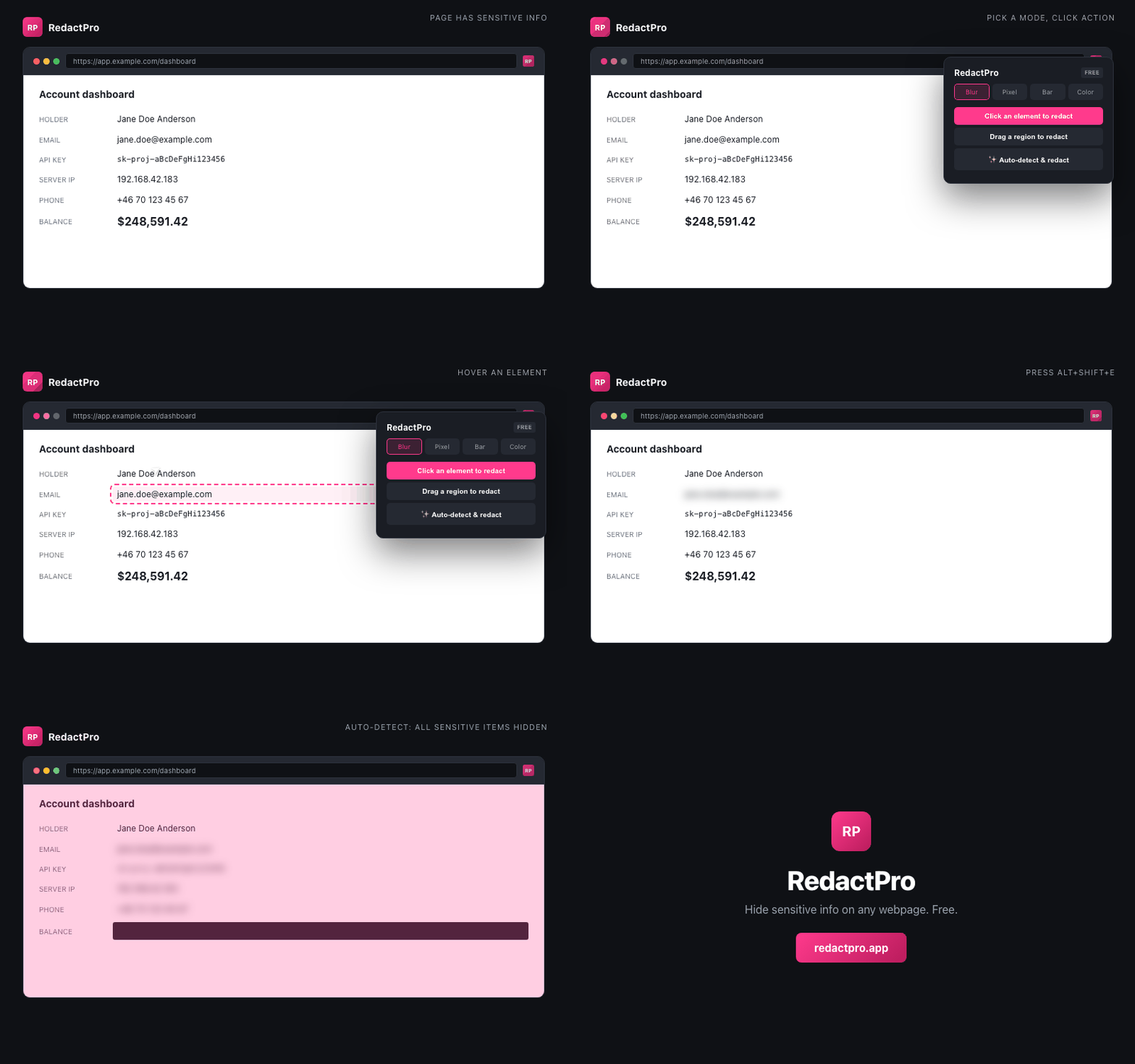
5 sensitive items hidden · Click any to reveal · Press Alt+Shift+E to auto-redact more

Built for people who share their screen

Whether you're recording a tutorial, presenting to a client, or asking for help in a forum — RedactPro keeps the sensitive stuff out of frame.

Click any element

Hover to highlight, click to redact. Works on text, images, divs — anything in the DOM.

Drag a region

Need to cover part of an image? Drag a rectangle anywhere on the page — it sticks even when you scroll.

Auto-detect sensitive

Pro detects 11 patterns automatically: emails, OpenAI/Anthropic/AWS/GitHub keys, IPs, credit cards, JWTs, UUIDs, SSNs.

📸

Screenshot redacted

Pro captures the visible page with redactions baked in. PNG straight to your Downloads.

⌨️

Keyboard shortcuts

Alt+Shift+R to start redacting, Alt+Shift+E to auto-detect. No popup hunting.

🔒

100% local

Page content never leaves your browser. We can't see what you redact — and we like it that way.

Four ways to hide

Pick the style that matches your context — soft blur for casual demos, solid bar for legal-grade redaction.

SECRET-CONTENT

Blur

Soft 10px blur. Layout intact.

SECRET-CONTENT

Pixelate

Chunky and unreadable.

Black bar

Solid redaction. Clean look.

Custom color

Match your brand colors.

Simple, honest pricing

Free forever for casual use. One-time payment for power users — no subscriptions, ever.

Free

For occasional redaction

$0
  • 3 redactions per page
  • All 4 redact styles
  • Click and drag selection
  • Local-only — no account required
+ Add to Chrome

Frequently asked

Anything else? Email hello@redactpro.io

Does RedactPro send my data anywhere?

No. Everything happens locally inside your browser using CSS filters and DOM overlays. We have no servers that see your page content. Even your Pro license is checked once, locally.

Can someone "un-redact" the page using devtools?

Yes — RedactPro is a visual aid for screensharing and screenshots, not cryptographic redaction. The underlying HTML is unchanged. For high-stakes use (medical, legal), redact at the source. For demos and tutorials, RedactPro is exactly what you need.

Why one-time pricing instead of subscription?

Because we hate subscription fatigue too. RedactPro runs entirely in your browser — there's nothing for us to keep paying for, so why charge you monthly? Pay once, use forever.

Which sites does RedactPro work on?

All of them. RedactPro injects on any URL — Gmail, Stripe, Google Sheets, Notion, your own admin dashboards, even local files. The extension uses activeTab, so it only does anything when you click the icon.

Is there a Firefox / Edge / Safari version?

Edge ships next — same Manifest V3 code. Firefox version is in progress. Safari requires a separate App Store app and is on the roadmap for later.

What's the refund policy?

14-day money-back guarantee, no questions asked. Email refunds@redactpro.io with your purchase email.
Stop redacting in Photoshop after the fact.

Install RedactPro and hide sensitive info before you hit record.

+ Add to Chrome — Free